
STEP 01
Separate requirements from evidence
Read the advert and list the responsibilities that matter most. Next to each one, write a real example from work, study, projects or volunteering. A requirement with no evidence is a gap to consider, not an instruction to invent a skill. In CV Maker, use the job comparison option where your account includes it, or make the list yourself. A wording match alone does not prove that you can do the work.
STEP 02
Change emphasis without changing the facts
Move the most relevant examples earlier in each role and use terms you understand. Keep job titles, employers and dates accurate. Explain an unfamiliar internal title in the description rather than replacing it with a more senior title. For each bullet, identify the action, the work and the outcome you can support. If you do not have a reliable number, describe the result in plain language instead.
STEP 03
Review assistance and keep a named version
If AI writing controls are available to your account, supply relevant notes and review every suggested sentence before applying it. Remove invented tools, numbers or responsibilities. Save an application-specific CV in My CVs when your plan has room, or edit your existing version. Use a clear document name so you can find what you sent. Check the PDF against the advert once more before submitting.
An example to work from
Requirement: explain technical issues to customers.
Evidence: wrote setup guidance from recurring support questions.
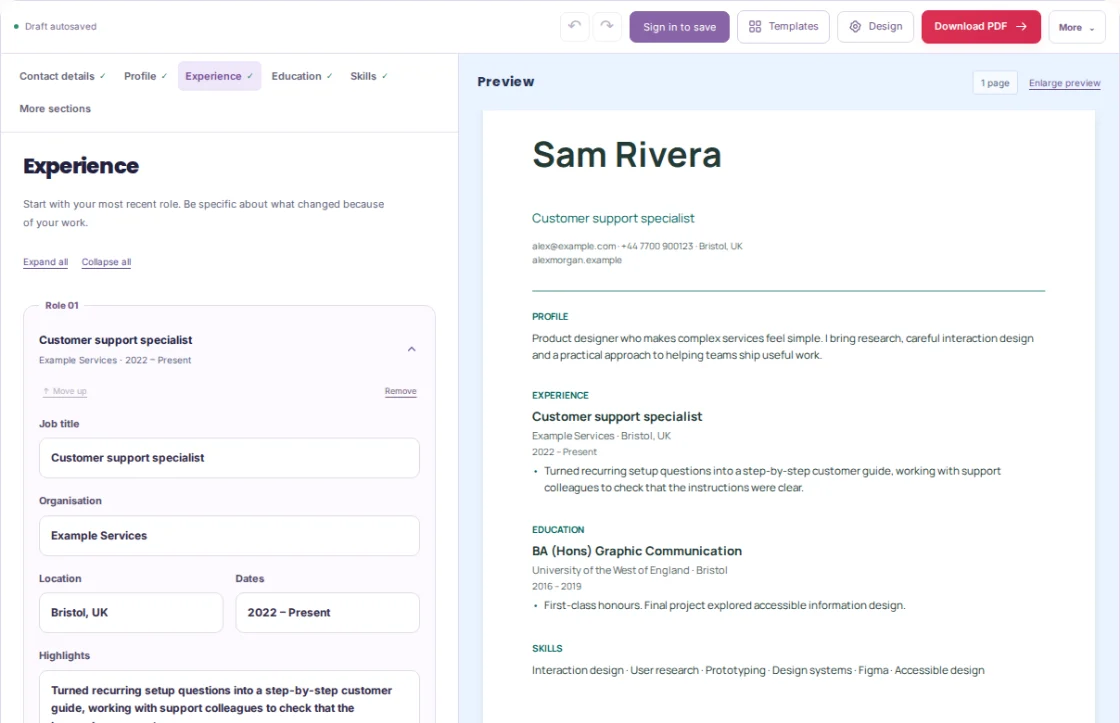
Bullet: Turned recurring setup questions into a step-by-step customer guide, working with support colleagues to check that the instructions were clear.
PUT IT INTO PRACTICE
Tailor a support CV for an onboarding role
- The fictional advert asks for onboarding guidance, clear writing and collaboration. Sam lists a help-guide update and work with the support team as evidence.
- Rewrite the relevant bullet to show Sam’s own contribution. Keep the original role title and dates. Do not add a claimed reduction in tickets unless Sam can support it.
- Put the most relevant bullet first, check the profile for the same focus and save a clearly named application version if space is available.
ADVERT PRIORITY → REAL EVIDENCE
Onboarding guidance → Updated a setup guide
Clear writing → Replaced ambiguous instructions with tested steps
Collaboration → Reviewed the draft with support colleagues

PROFILE DIRECTION
Customer support specialist with experience turning recurring setup questions into practical onboarding guidance.
The names and examples are fictional. Replace them with your own work. Neither an AI suggestion nor a comparison result verifies that a claim is true.
Common mistakes to avoid
- Keyword stuffing
- A list of copied phrases gives the reader little evidence. Use relevant terms within examples that explain the work.
- Letting an AI rewrite add an unsupported result
- Check each number, tool and responsibility against your notes before accepting the sentence.
- Losing track of which version you sent
- Use a clear document name and retain the final PDF with your application records.
Before you finish
Your final CV should reflect your own experience and the actual role, without copying whole sentences from the advert.
- The advert’s main requirements have been identified.
- Each included claim has real supporting evidence.
- Dates, employers and job titles remain accurate.
- The profile matches the examples below it.
- AI suggestions, if used, have been checked line by line.
- The final application version is identifiable.
Further reading
Official references for the topics covered in this guide.