
STEP 01
Choose public text or a public page URL
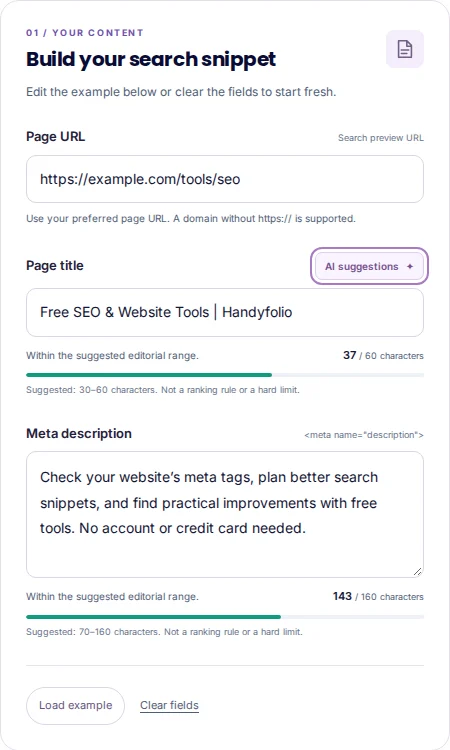
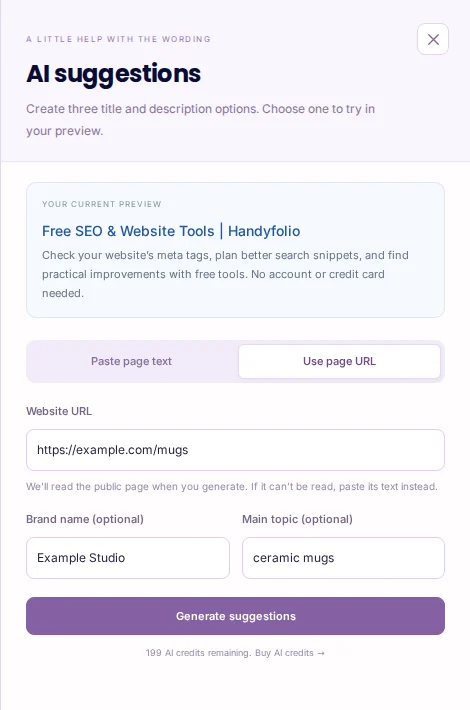
Sign in, open SERP Preview and choose AI suggestions when available to your account. Paste page text lets you describe what visitors can find or do, or paste the page’s main public content. Use at least 80 characters and include useful details rather than a tagline. Use page URL is an alternative when shown: enter the exact public page address. The page is read when you select Generate suggestions, not merely when you type the address. Add a brand name and main topic if they help explain the page.
STEP 02
Generate and compare the three options
Review the first-use disclosure if prompted, then select Generate suggestions. Compare all three title-and-description pairs against the actual page. Check product names, locations, services and any promises. A suggestion about discounts, delivery or availability is unsuitable unless the page supports it. If the URL cannot be read or has too little useful public text, choose Paste page text instead and supply the relevant content yourself. Do not paste private account pages or confidential material to work around that limitation.
STEP 03
Apply, refine and publish the tags yourself
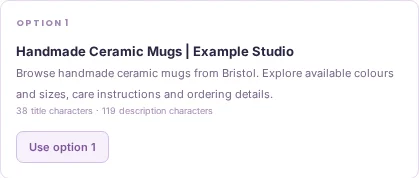
Use option 1, 2 or 3 to put that pair into your search preview. You can edit the title and description afterwards, and Undo can restore the previous wording immediately after applying. The illustrative desktop and mobile previews help you review the text, but they do not predict an exact search result. Copy the generated tags or transfer the fields into your CMS, publish the page and check it with Meta Tag Checker. Applying a suggestion does not publish changes to your website. Search engines may use different titles or snippets.
An example to work from
PUBLIC PAGE TEXT
Handmade ceramic mugs made in Bristol. Browse our available colours and sizes, learn how to care for your mug, and find ordering information from Example Studio.

OPTIONAL BRAND
Example Studio

OPTIONAL MAIN TOPIC
Ceramic mugs
PUT IT INTO PRACTICE
Draft a snippet for a fictional ceramic-mug page
- Paste the public page text above, or choose Use page URL and enter the relevant public address when that mode is available. The optional brand is Example Studio and the topic is ceramic mugs.
- Generate the three options. Reject any invented discount or delivery promise. Compare whether the title identifies the page and the description gives an accurate reason to visit.
- Apply the preferred pair, edit it if needed and check both preview widths. Copy the tags into your website or CMS, publish and check the returned HTML separately.
EXAMPLE TITLE
Handmade Ceramic Mugs | Example Studio

EXAMPLE DESCRIPTION
Browse handmade ceramic mugs from Bristol. Explore available colours and sizes, care instructions and ordering details.

NOT SUPPORTED BY THE NOTES
Free next-day delivery on every order.
This is an example pair, not a predicted search result. A URL request reads publicly available page content; protected or unreadable pages may require the pasted-text route. Neither route publishes the resulting wording.
Common mistakes to avoid
- Using a homepage URL for every page
- Supply the specific page you want to describe, or paste content relevant to that page.
- Treating character guidance as a guarantee
- Display width, query and search-engine choices vary. Check clarity and accuracy as well as length.
- Forgetting to publish the tags
- The preview is an editor. Update your actual website separately and verify the published HTML.
Before you finish
Keep the option that accurately introduces this page. A polished snippet does not guarantee ranking, indexing or a particular display.
- The input describes the intended public page.
- Only content you are permitted to use has been supplied.
- All three options have been compared.
- Every claim is supported by the page.
- The applied wording has been reviewed at both widths.
- The actual published metadata has been checked.
Further reading
Official references for the topics covered in this guide.